The Other BDD - Bead Driven Development
I’ve been using AI agents exclusively to write code for a few months now. It’s been a cool experience, but some surprising things have surfaced, showing that my main challenge is not writing code, but capturing and organizing the work agents uncover.
- Agents surface more work than I can write down by hand.
- I like to build entire epics in a single run, but agents lose context and can’t see the whole picture, which makes that harder to sustain.
- I also like to have agents work unattended overnight and “pick up” new work, but that creates another transition problem.
- Beads turns out to be a better way to capture and organize work than tickets.
A bit of context
I’ve created a development harness that uses AI agents to write code. The agents have roles I believe are important for development teams (e.g., architects, testers, and devs), and they can communicate with one another. I have skills that invoke the agents, and the main one is feature delivery. The feature delivery plugin is meant to drive the development of features mostly unattended.
The problem
My setup worked reasonably well, but I was running into a few problems that made the workflow harder to keep moving.
- As the agents work on things, they find issues they need to fix. That’s not a problem in itself, but it raises the question of what to do about the issues, which in turn drives the next problem.
- I like to build entire epics in a single run, but agents lose context and can’t see the whole picture. I found that the agents seemed to lose track or not do what they were supposed to do. I would have to intervene and tell them what to do next, which is not ideal.
- This one is a me thing, but I do feel some pressure to optimize my work with agents. They could be doing stuff while I’m sleeping! The challenge is that when it’s done with a task, there isn’t an easy way to let them know what other tickets are safe to work on.
Beads are agent sized
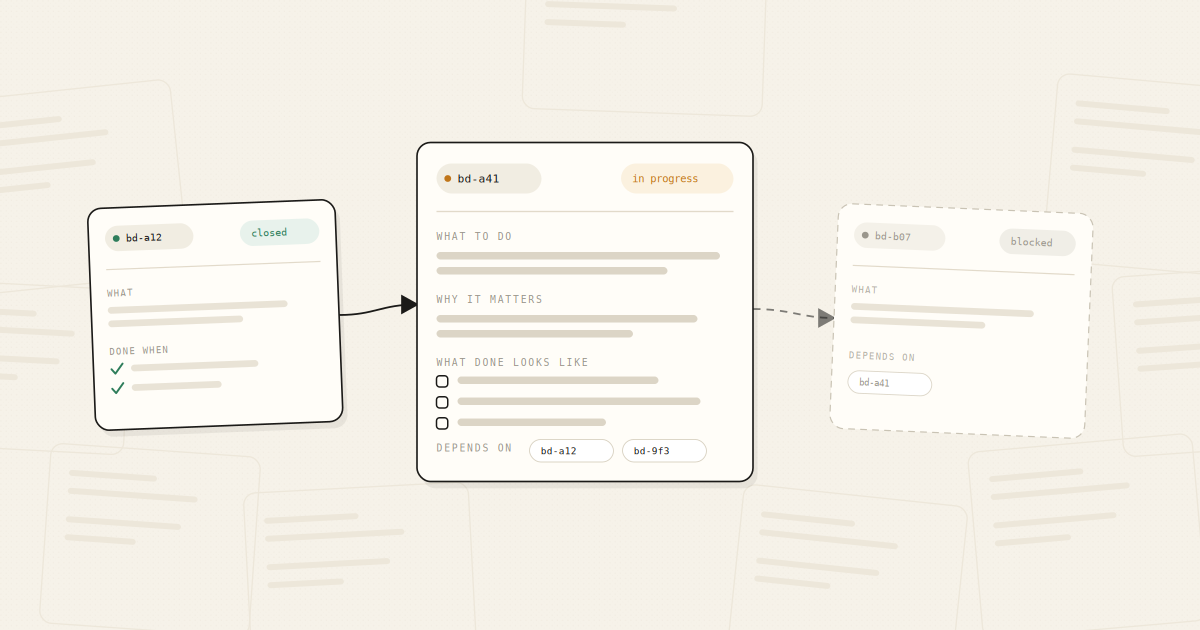
A bead is a small, self-contained unit of work: what to do, why it matters, what done looks like, and what it depends on. The size constraint is not aesthetic. It is the whole point. Steve Yegge, who wrote the thing, introduces beads as a memory system for coding agents rather than as an issue tracker, and a few weeks in, that is the more useful way to hold it.
Agents lose their context. Sessions get cleared, windows fill up, a run dies at 2 am. So if the work is captured as a single atomic bead, a completely fresh agent with no memory of the conversation can read it and pick up where the last one left off.
That is a higher bar than “a ticket a teammate could take”, because a teammate was in the standup and remembers what we agreed, whereas the agent has only what is written down. The agent has whatever is written in the bead and nothing else.
- Beads are self-contained units of work, stored in a directed acyclic graph.
- The beads are stored in a doltdb that is git backed.
- You can manipulate the beads using a command-line tool, and the agents can read and write beads through the same interface.
- If you want something more visual, you can set up Bead Me Up Scotty for a GUI.
Setting up
Setting up beads is pretty straightforward. You can set it up through Homebrew or through npm; the same goes for the Bead Me Up Scotty GUI. I run a meta repo (a repo where subrepos are set up as git submodules), and I have the beads folder set up at the root of the meta repo. You can have a beads folder in each repo as well, if you want. I’ve also set it up with the beads folder in a separate repo so that other team members can see the beads.
Beads can integrate with JIRA, so if you use that, you can import tickets into beads. It has native support for epics, stories, and tasks, and you can also create your own custom bead types. Key concepts to leverage when setting up beads:
- Dependencies and gates are expressed as beads. Beads can be chained together to form a dependency graph, and you can create machine gates or human gates that block moving forward until a condition is met.
- Use Labels to categorize beads. There is a built-in label called “skill” that can be used to assign an agent to a bead (you can also get creative with labels)
- Molecules are a logically grouped set of beads that the agent can work on together.
- Formulas are a declarative workflow template. I converted my feature delivery workflow into a formula, and it ties the whole workflow together.
To be honest, I used Claude to help set everything up, based on how I like to work and leaning into the benefits of beads.
How I’m Getting on
So far it’s been great. There are a bunch of things you can do with beads, and it’s a robust CLI, but I wrapped the interface in commands and skills I use in Claude, so the workflow stays connected (I very rarely use bd commands directly).
I have custom scripts for stamping beads with sessions, creating epics, and approving work (part of the reason for this is that some of the commands would get mangled in my remote control sessions)
Within the first few days of using beads, my agents created 800 beads and closed them. By making my feature delivery pipeline aware of beads, it “knows” when to table certain fixes and refactors for later. I maintain a link between top-level epics and tickets in GitHub, and I focus more on user-facing features than on wrangling bugs. I even created an overnight delivery pipeline that will pick up new tickets and deliver them.
Bead me up Scotty is a great way to visualize the beads and their dependencies, and it includes some nice features, such as a section showing human-gated beads, a Kanban board of beads, and the ability to use AI to rewrite a bead’s description.
I’ve also been able to tweak my feature delivery to provide clear context between stories, so some of the context limitations are mitigated.
All in all, it’s been a great addition to my overall workflow.